> ## Documentation Index
> Fetch the complete documentation index at: https://docs.pezzo.ai/llms.txt
> Use this file to discover all available pages before exploring further.
# Versioning & Deployments
Pezzo allows you to create multiple versions of your prompts and deploy them to your environments.
## Commiting a New Version
After making changes to a prompt, you can commit a new version by clicking the **Commit** button in the top right corner of the prompt editor. A pop-up will appear, where you will provide a commit message.
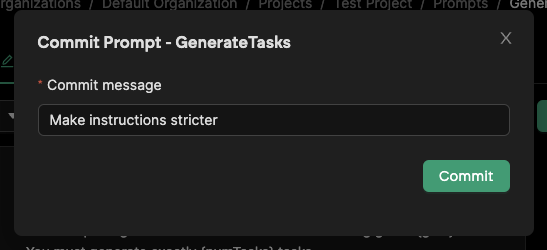 After confirming, a new version will be created and is ready for deployment.
## Publishing a Version
To publish a version, click the **Publish** button in the top right corner of the prompt editor. A pop-up will appear, where you will select the environment you want to deploy to.
After confirming, a new version will be created and is ready for deployment.
## Publishing a Version
To publish a version, click the **Publish** button in the top right corner of the prompt editor. A pop-up will appear, where you will select the environment you want to deploy to.
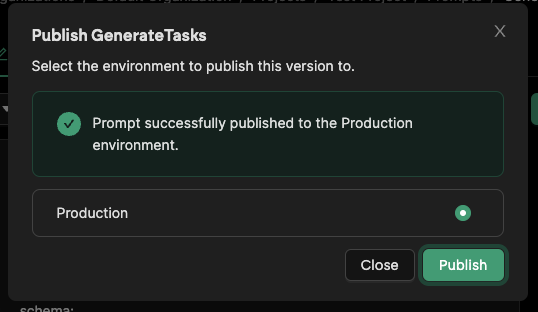 After clicking **Publish**, the prompt will be deployed to the selected environment instantly.
The ability to instantly publish changes is powerful. However, it can lead to issues if you are not careful. It is advised to set up a pre-production environment to test your changes before deploying to Production. [Learn about Environments in Pezzo](/platform/prompt-management/environments).
## Rolling Back a Version
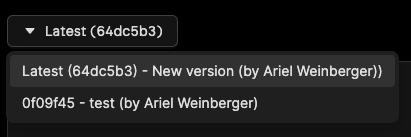
You can always publish an older version of a prompt. To do this, simply click on the version selector in the editor and select the desired version. Then, publish as usual.
After clicking **Publish**, the prompt will be deployed to the selected environment instantly.
The ability to instantly publish changes is powerful. However, it can lead to issues if you are not careful. It is advised to set up a pre-production environment to test your changes before deploying to Production. [Learn about Environments in Pezzo](/platform/prompt-management/environments).
## Rolling Back a Version
You can always publish an older version of a prompt. To do this, simply click on the version selector in the editor and select the desired version. Then, publish as usual.
 ## Commit History
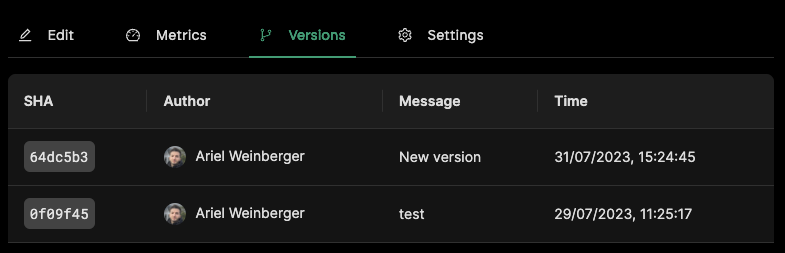
When selecting a prompt, you can navigate to the **Versions** tab to see a full list of versions for the prompt.
## Commit History
When selecting a prompt, you can navigate to the **Versions** tab to see a full list of versions for the prompt.
We are working on a feature that will allows you to view the differences between versions. This will be available soon.